Canada Post21.2.0.25652
Publisher Description


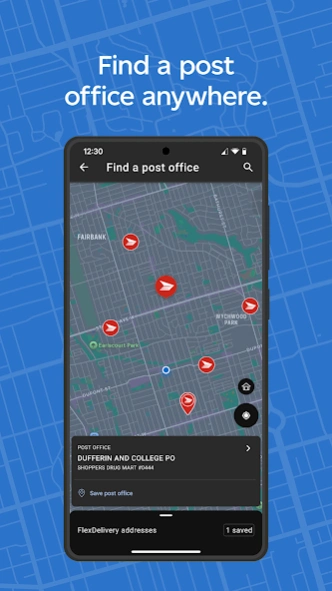
Meet the Canada Post app. Your go-to for sending, receiving, and tracking mail.
Whether you’re tracking a package, checking what’s coming to your doorstep or paying duties and taxes with a tap, it makes it all quick and easy.
Here’s what you can do:
• Track packages in an instant. Just scan the barcode, no typing required.
• See what mail is on the way. Get daily updates with MyMail.
• Pay duties and taxes. Use Google Pay™, Apple Pay® or a credit card for fast, secure payments and other self-serve options.
• Never miss a delivery. Receive real-time alerts via push, text or email.
• Got a question? Our virtual assistant is ready to help, anytime.
• Find what you need fast. Look up nearby post offices, shipping rates or postal codes in seconds.
• Simplify international shipping. Complete mandatory customs forms online with ease.
• Pick up at your convenience. Choose the post office that works for you with FlexDelivery™.
• Confirm delivery. Get photo confirmation when your package is delivered.
• Access your business card instantly. Scan and save your Solutions for Small Business™ card.
• Make it your own. Customize delivery preferences.
• Returns made easier. Start a return by scanning your prepaid label with Self Scan.
Questions or suggestions? Share your feedback by leaving a review or contact us at mobile.apps@canadapost.ca
Download the Canada Post app now and experience a smarter way to manage your mail!
About Canada Post
The company that develops Canada Post is Canada Post Corporation. The latest version released by its developer is 21.2.0.25652. This app was rated by 1 users of our site and has an average rating of 3.0.
To install Canada Post on your Android device, just click the green Continue To App button above to start the installation process. The app is listed on our website since 2026-07-31 and was downloaded 13 times. We have already checked if the download link is safe, however for your own protection we recommend that you scan the downloaded app with your antivirus. Your antivirus may detect the Canada Post as malware as malware if the download link to com.canadapost.android is broken.
How to install Canada Post on your Android device:
- Click on the Continue To App button on our website. This will redirect you to Google Play.
- Once the Canada Post is shown in the Google Play listing of your Android device, you can start its download and installation. Tap on the Install button located below the search bar and to the right of the app icon.
- A pop-up window with the permissions required by Canada Post will be shown. Click on Accept to continue the process.
- Canada Post will be downloaded onto your device, displaying a progress. Once the download completes, the installation will start and you'll get a notification after the installation is finished.
Program Details
System requirements
Download information
Pricing
Version History
version 21.2.0.25652
posted on 2026-07-31
Keeping things running smoothly.
This update includes behind-the-scenes improvements and squashes some pesky bugs.
Have feedback or questions? We’re always listening – reach out at mobile.apps@canadapost.ca.
version 21.0.0.25033
posted on 2026-06-02
New: Create return and shipping labels!
You can now generate return labels with a single tap, and everything you need to generate and pay for shipping labels is now in the app. Quick, convenient shipping and returns, wherever you are.
version 19.0.0.23223
posted on 2026-01-27
Completing a customs form just got easier. Our revamped form is quicker and simpler, helping your packages arrive smoothly while saving you time.
version 18.1.0.21585
posted on 2025-10-10
Dark mode simplified: It just got easier to switch to dark mode. Now you can make the switch using the toggle in your profile.
Quick actions at your fingertips: Access the tools you need right away. Jump to find a post office, get support and more with quick actions on your home screen.
Streamlined password management: Manage your password from your profile. Now you can change your password without leaving the app.
version 17.4.1.20902
posted on 2025-08-25
Sending to the U.S.?
As of August 29, 2025, the United States requires all packages entering the U.S. to have duties prepaid. To complete payment and declaration, use the Zonos app to pay duties before heading to the post office.
version 17.4.0.20274
posted on 2025-07-03
Clearer customs, easier payments!
We've made it easier to understand and pay your customs owing.
Now, there's a clear breakdown of the duty, taxes and the handling fee on the mobile app. Plus, you can pay in advance for a smoother delivery.
version 17.2.1.19879
posted on 2025-05-13
Minor fixes and enhancements
For feedback or questions about the functionality of the app, please contact us at mobile.apps@canadapost.ca
version 17.1.0.19697
posted on 2025-04-04
MyMail
Get a clearer and more organized view of your incoming mail:
More distinction between addressed mail and promotional offers.
Find a Rate
Easily identify weight and dimensions restrictions:
Oversize fees will display when package dimensions exceed limits.
The On-Time Delivery Guarantee was updated. It is void for shipments that need special handling, that are oversized, are in mailing tubes or unpackaged.
version 17.0.0.19330
posted on 2025-02-21
Introducing Dark Mode!
Switch to the new Dark Mode theme for a better viewing experience, especially in low-light.
To activate Dark Mode within the app, make sure it's enabled in your device settings.
Quick Drop Name Change
Quick Drop is now named Self Scan to differentiate the service and highlight its value.
version 16.3.0.17893
posted on 2024-10-10
Streamlining Canada Post accounts
This update includes changes at the account level. You will be asked to link your email to a single username for an improved sign-in experience.
